Modbus Source
The Tributech Modbus Source allows to connect to Modbus TCP devices, or to serial slaves behind a TCP-to-serial gateway, and read coils and registers from them. The Source acts like a Modbus TCP client in a docker environment and enables the forwarding of the data to a Tributech Agent stream.
The Tributech Modbus Source is released as version 0.2.0 (beta) and requires Tributech platform 5.6 or later.
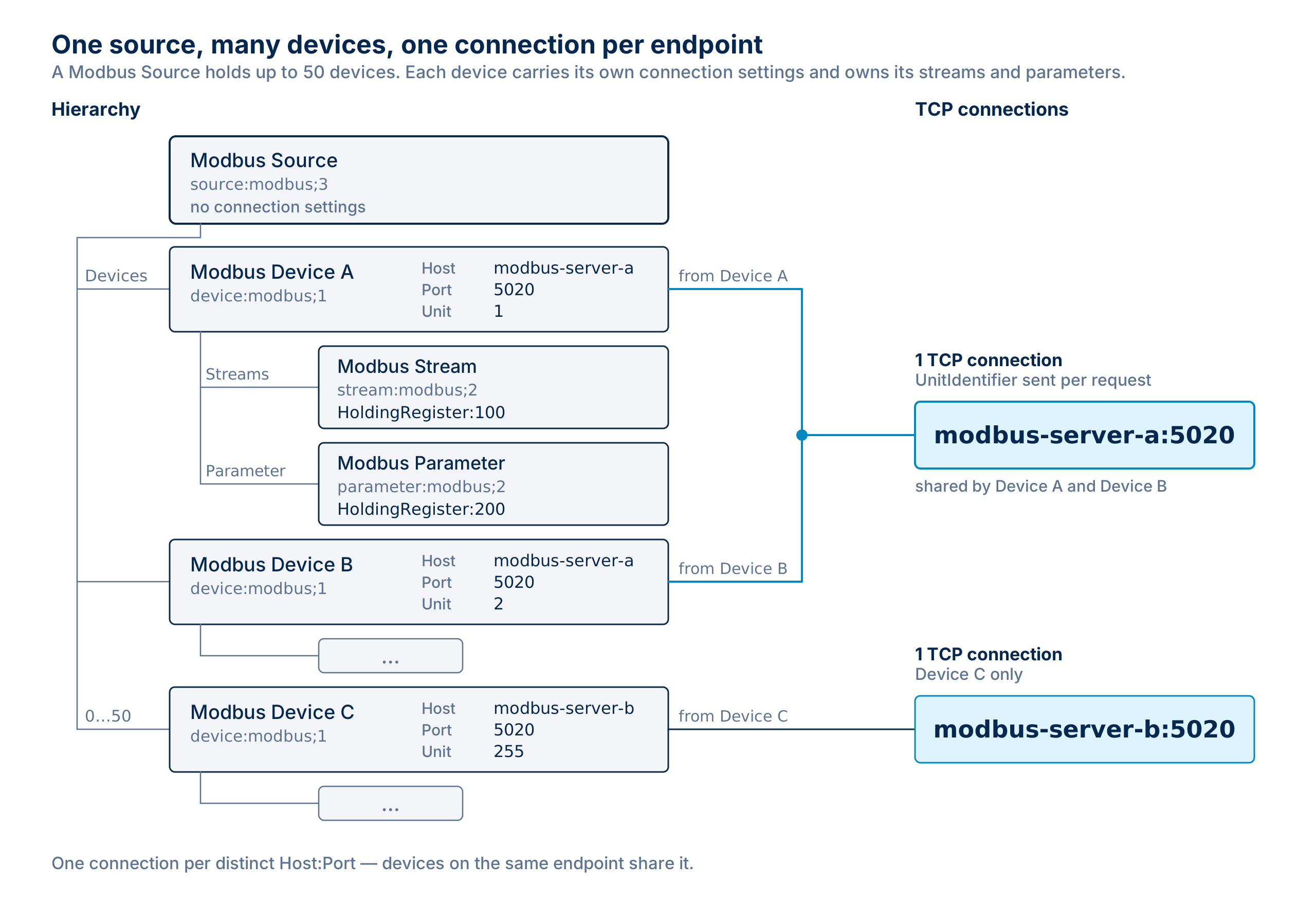
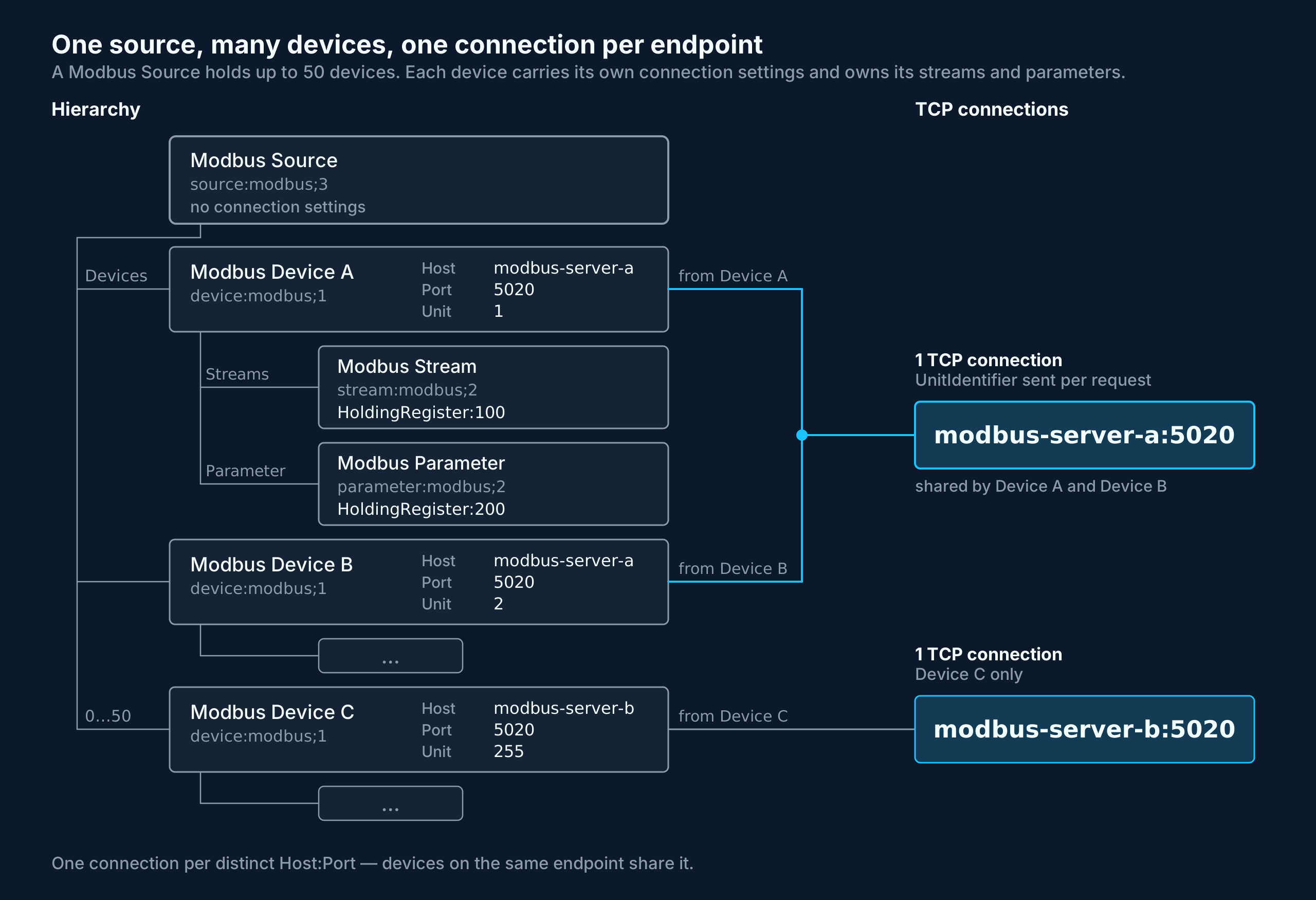
One Source serves up to 50 Modbus devices. Each device carries its own connection settings and owns the addresses read from it, so a single Source can cover several devices on a plant network as well as several serial slaves behind one gateway.
The Tributech Modbus Source repeatedly, in a fixed cycle:
- reads the coils and registers configured as streams and forwards each value to the Tributech Agent (one value stream per address),
- writes the values configured as parameters onto the device and keeps them asserted,
- reports its health, so the reachability of every device and the state of every configured address is visible in the Tributech Node (see Health Check).
Single values can additionally be written on demand with the WriteOnce Command.
Setup
The Tributech Modbus Source image can be started without any dependencies but will not be functional without a valid Twin Configuration or MessageBroker connect to the Tributech Agent. The TwinConfiguration can be provided via the Tributech Node (recommended) or MessageBroker (see Source Integration). The Modbus Source will automatically connect to the Tributech Agent if the Tributech Agent is running and correct MessageBroker settings are set.
In the following part we will describe the setup of a Tributech Modbus Source.
- Create a
docker-compose.ymlfile with the following content (adjustments required):
version: '3.6'

services:
  # Prepares the bind-mounted folders for the Tributech Agent, which runs as the
  # non-root user 1654 and ships without the tooling to change ownership itself.
  # This replaces a manual `sudo chown -R 1654:1654 enrollment volumes` on the host.
  init-permissions:
    image: busybox:1.36
    user: "0:0"
    command: sh -c "chown -R 1654:1654 /mnt/enrollment /mnt/volumes"
    volumes:
      - ./enrollment:/mnt/enrollment
      - ./volumes:/mnt/volumes

  source-modbus:
    restart: unless-stopped
    image: ${DOCKER_REGISTRY-tributech.azurecr.io/}tributech-source-modbus:${SOURCE_TAG:-0.2.0}
    depends_on:
      - mosquitto-server
      - tributech-agent
    environment:
      - MqttOptions__MQTTHost=mosquitto-server
      - Logging__LogLevel__Default=Information
    networks:
      - modbus-net
    logging:
      driver: "json-file"
      options:
        max-size: "2m"
        max-file: "5"

  tributech-agent:
    image: ${DOCKER_REGISTRY-tributech.azurecr.io/}tributech-agent:${AGENT_TAG:-5.6.0}
    depends_on:
      mosquitto-server:
        condition: service_started
      init-permissions:
        condition: service_completed_successfully
    environment:
      - Logging__LogLevel__Default=Information
      - MqttOptions__MQTTHost=mosquitto-server
      - EdgeDeviceOptions__NodeUrl=${NODE_URL:?"The Tributech Node Url is required"}
    networks:
      - modbus-net
    ports:
      - "5001:8080" # enable access to agent REST-API
    volumes:
      - ./volumes:/app/data # volume mapping for permanent storage of keys and datatwin file
      - ./enrollment:/app/enrollment # local enrollment folder mounted to /app/enrollment
    restart: unless-stopped
    logging:
      driver: "json-file"
      options:
        max-size: "2m"
        max-file: "5"

  mosquitto-server:
    image: eclipse-mosquitto:${MQTT_TAG:-1.6}
    restart: unless-stopped
    networks:
      - modbus-net

networks:
  modbus-net:
The enrollment and volumes folders must be accessible to the unprivileged user the Agent runs as, see
Container File Permissions.
Adjust the setting for the Tributech Agent to your environment, sample value:
tributech-agent:
    ...
    environment:
      ...
      - EdgeDeviceOptions__NodeUrl=https://my-environment.tributech-node.com
The Tributech Agent authenticates with the Tributech Node using enrollment certificates provided through a local enrollment folder mounted into the container (the ./enrollment:/app/enrollment volume in the docker-compose.yml above). See Authentication Certificates (Enrollment) and Docker volumes in the Setup guide for how to create and provide it. If no Agent ID is configured, the agent generates a random one on first start.
The Modbus Source needs to reach every configured Modbus TCP device on its Modbus port (502 by default) in the private network, see Tributech Agent Source Requirements.
Configuration
After setting up the Tributech Modbus Source we need to activate it in the Tributech Node (see Agent Management) and configure the TwinConfiguration.
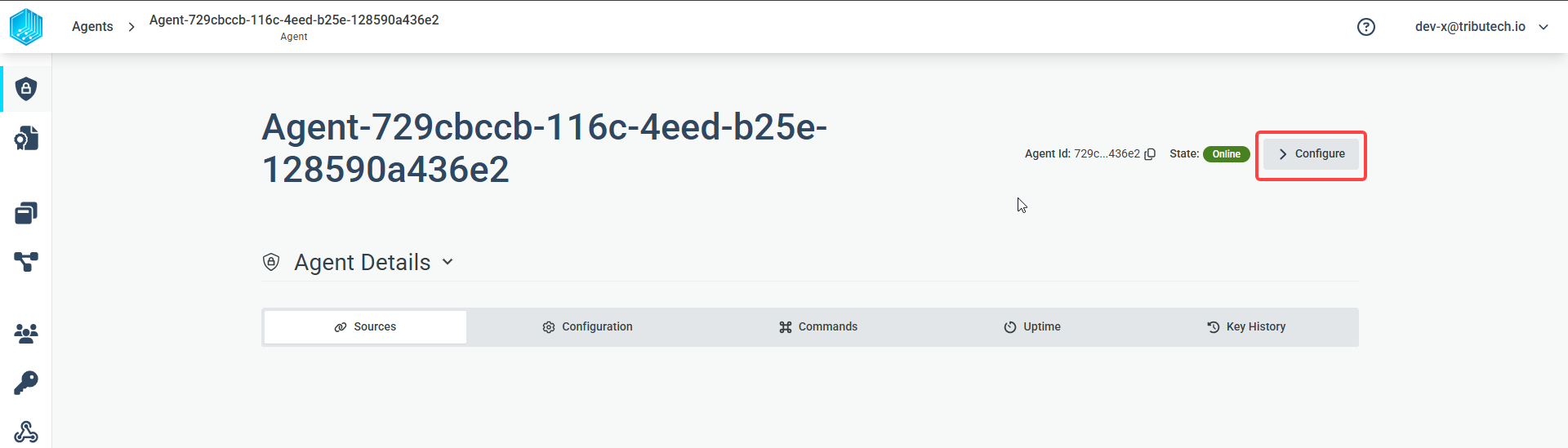
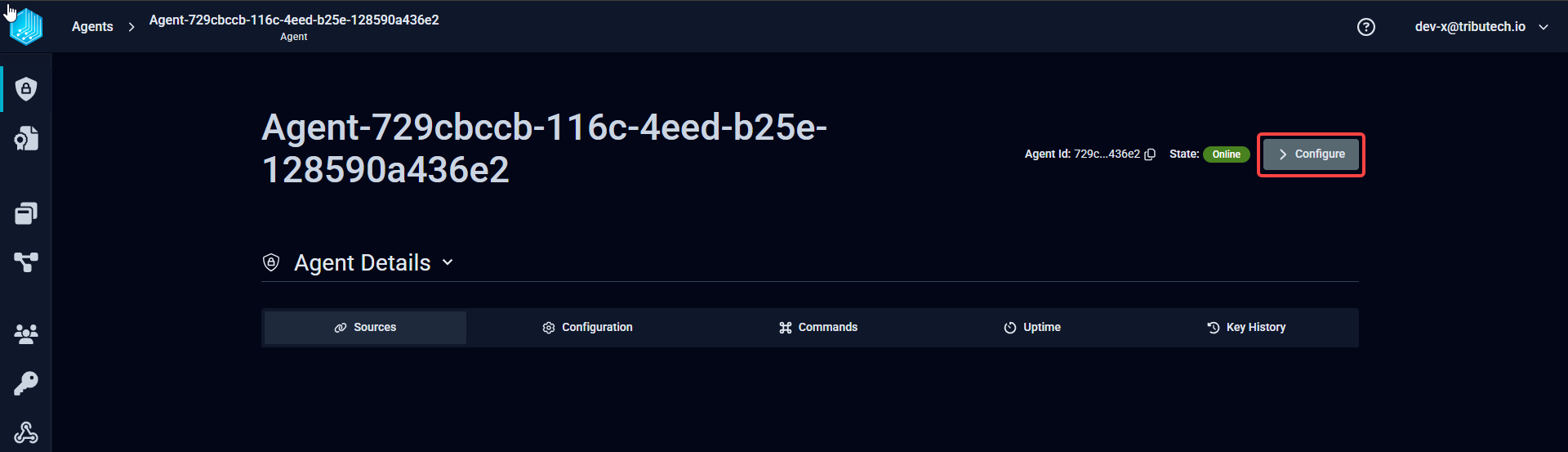
The complete configuration of the Modbus Source is done with the Twin Configuration, there is nothing to edit by hand on the edge device. The Agent keeps the configuration it receives in its volumes folder, together with its keys and certificates (see Docker volumes), so it survives a restart of the edge device and does not have to be applied again. Changes are picked up by the running Source, it does not need to be restarted.
| Twin | Model | Purpose |
|---|---|---|
| Modbus Source | dtmi:io:tributech:source:modbus;3 | Groups the devices. Carries no Modbus settings itself. Attached to the edge device twin. |
| Modbus Device | dtmi:io:tributech:device:modbus;1 | One per device to be reached. Holds the connection settings and the timing. Attached to the source twin via the Devices relationship, up to 50 per source. |
| Modbus Stream | dtmi:io:tributech:stream:modbus;2 | One per address to be read. Attached to a device twin via the Streams relationship. |
| Modbus Parameter | dtmi:io:tributech:parameter:modbus;2 | One per address to be held at a fixed value. Attached to a device twin via the Parameter relationship. |
Streams and parameters always belong to a device, not to the source. The same address can therefore be configured on several devices without the configurations interfering with each other.
Modbus Source
We can now add a new Modbus Source with the three dots menu on the right side of the Device Edge entry. The Source carries no connection settings, those live on the devices below it:
| Setting | Value | Required | Default | Description |
|---|---|---|---|---|
| Name | string | No | — | Human-readable name of the source. Display name only. |
| Expected Health Frequency | ISO 8601 duration | No | — | How often the Source reports its health state, i.e. PT30S for 30 seconds, PT5M for 5 minutes, PT1H for one hour. Left empty, the Source sends no health messages. |
Modbus Device
We then add a Modbus Device with the three dots menu on the right side of the Modbus Source entry, selecting Add Devices. Every device we want to read from gets its own entry, with the connection settings of that device:
| Setting | Value | Required | Default | Description |
|---|---|---|---|---|
| Host | string | Yes | — | IP address or hostname of the Modbus TCP device or gateway. |
| Port | integer | No | 502 | Modbus TCP port. |
| UnitIdentifier | 0…255 | No | 255 | Selects the device behind the address, see Unit Identifier. |
| DefaultReadCycleInterval | seconds | No | 10 | How often this device is polled. Applies to every stream of the device that does not define its own interval. Values below 1s are treated as 1s. |
| WriteCycleInterval | seconds | No | 10 | How often the parameter values of this device are re-asserted. Values below 1s are treated as 1s. |
| Name | string | No | — | Display name only. |
A sample device configuration:
{
  "Name": "Compressor 1",
  "Host": "192.168.1.50",
  "Port": 502,
  "UnitIdentifier": 255,
  "DefaultReadCycleInterval": 5,
  "WriteCycleInterval": 5
}
Connections
The Source opens one TCP connection per distinct Host and Port, not one per device. Devices that share an address share the connection, and the UnitIdentifier is sent with every single request to select the device behind it. This is what makes a TCP-to-serial gateway work: all slaves behind it are configured as separate devices with the same Host and Port and different unit identifiers, and the Source talks to them over one session.
Two consequences are worth knowing:
- An address is identified by the Host string as written, plus the Port. The string is trimmed and compared case-insensitively, but it is not resolved, so
plc-01and192.168.1.50count as two different addresses and get two connections even when they point at the same device. - A configuration change only reconnects the addresses it adds or removes. Adding a stream, changing a parameter or changing a UnitIdentifier never drops a working connection, and a device becoming unreachable does not affect devices on other addresses.
Unit Identifier
| Value | Use |
|---|---|
255 | Device addressed directly over Modbus TCP. This is the default. |
1…247 | Serial slave behind a TCP-to-serial gateway, or a TCP device that insists on an identifier. Use the slave ID of the device. |
248…254 | Reserved by the specification. Accepted, but only useful if the device documentation asks for it. |
0 | Broadcast address on the serial side. A gateway forwards the request and no slave answers it, so every read of this device times out. |
A UnitIdentifier of 0 is accepted and logged as a warning, but the device will not answer. Because the requests still travel over the connection shared with the other devices on that address, the timeouts also count towards that connection being declared lost. Only use 0 if the device documentation explicitly asks for it.
A value outside 0…255 does not fit into the Modbus protocol header. The device is dropped from the configuration with an error, no requests are sent for it, and a WriteOnce Command addressed to it is rejected.
Modbus Stream
We can then add a new Modbus Stream with the three dots menu on the right side of a Modbus Device entry, selecting Add Streams. Each stream describes exactly one address on that device.
| Setting | Value | Required | Default | Description |
|---|---|---|---|---|
| Identifier | RegisterType:Address | Yes | — | Which address to read, see Addressing. |
| Datatype | BOOL, INT16, UINT16, INT32, UINT32, FLOAT32, FLOAT64 | Yes | — | How the device stores the value. This also decides how many registers are read. |
| Encoding | BOOL, INT32, INT64, FLOAT, DOUBLE, BYTEARRAY, STRING_UTF8, STRING_BASE64 | Yes | — | How the value is published to the platform. Must fit the Datatype, see Datatype and Encoding. |
| WordOrder | HighWordFirst / LowWordFirst | No | HighWordFirst | Register order for values spanning several registers. Must match what the device documentation states. Ignored for BOOL, INT16 and UINT16. |
| ReadCycleInterval | seconds | No | device default | Overrides DefaultReadCycleInterval for this stream only. |
| Name, Unit | string | No | — | Descriptive only. |
We can continue adding every address we want to read from that device, and repeat this for the other devices. After all devices and streams have been configured, we can apply the configuration to the Tributech Agent by clicking on the APPLY CONFIGURATION button in the top right corner.
A sample stream configuration:
{
  "Name": "Motor temperature",
  "Identifier": "HoldingRegister:100",
  "Datatype": "INT32",
  "WordOrder": "HighWordFirst",
  "Encoding": "INT32",
  "Unit": "°C"
}
Without a reachable Modbus device we will not receive any data on the Tributech Node.
Addressing
The Identifier is written as RegisterType:Address, for example HoldingRegister:100. The following register types are supported:
| Register type | Access | Typical content |
|---|---|---|
Coil | read / write | Switchable digital output |
DiscreteInput | read only | Digital input |
HoldingRegister | read / write | Setpoints, configuration, measured values |
InputRegister | read only | Measured values |
- The register type is case-sensitive,
holdingregister:100is not accepted. - The address is the 0-based PDU address. Vendor documentation often uses 1-based or 4xxxx-style numbering, i.e. the vendor register 40101 corresponds to
HoldingRegister:100. - An address that cannot be parsed marks the stream as permanently faulty. It is then no longer polled and the Source reports
Degraded, all other streams keep working.
Datatype and Encoding
Datatype describes the device side, Encoding the platform side. They are not matched up automatically and need to be selected together:
| Datatype | Registers read | Encoding to use |
|---|---|---|
BOOL (only for Coil / DiscreteInput) | — | BOOL |
INT16 / UINT16 | 1 | INT32 |
INT32 / UINT32 | 2 | INT32 |
FLOAT32 | 2 | FLOAT |
FLOAT64 | 4 | DOUBLE |
| any of the above | — | BYTEARRAY, if the raw bytes are wanted instead of a number |
The platform has no 16-bit encoding. An INT16 or UINT16 stream reads its single register and publishes it widened to a 4-byte INT32 with the same numeric value: INT16 keeps its sign, so a register holding 0xFFFE arrives as -2, and UINT16 is filled up with zeroes, so 0xFFFF arrives as 65535.
Use INT16 or UINT16 for a register that really holds a 16-bit value, and let the Source widen it. Configuring INT32 instead reads a second register that does not belong to the value, and whatever that register happens to contain silently ends up in the published number.
A multi-register datatype consumes consecutive addresses: INT32 at HoldingRegister:100 reads 100 and 101, FLOAT64 reads 100 to 103. The device needs to store the value across all of them, and no other stream should be configured on an address that is already part of a wider value.
Writing is not widened. A parameter or a WriteOnce Command with a 16-bit datatype is checked against the 16-bit range and written as exactly one register.
Word Order
WordOrder decides in which order the registers of a value spanning several registers are combined, and is set per stream and per parameter.
The following figure shows how the Datatype decides the width of a value behind one Identifier, and what the WordOrder does to a value spanning two registers:
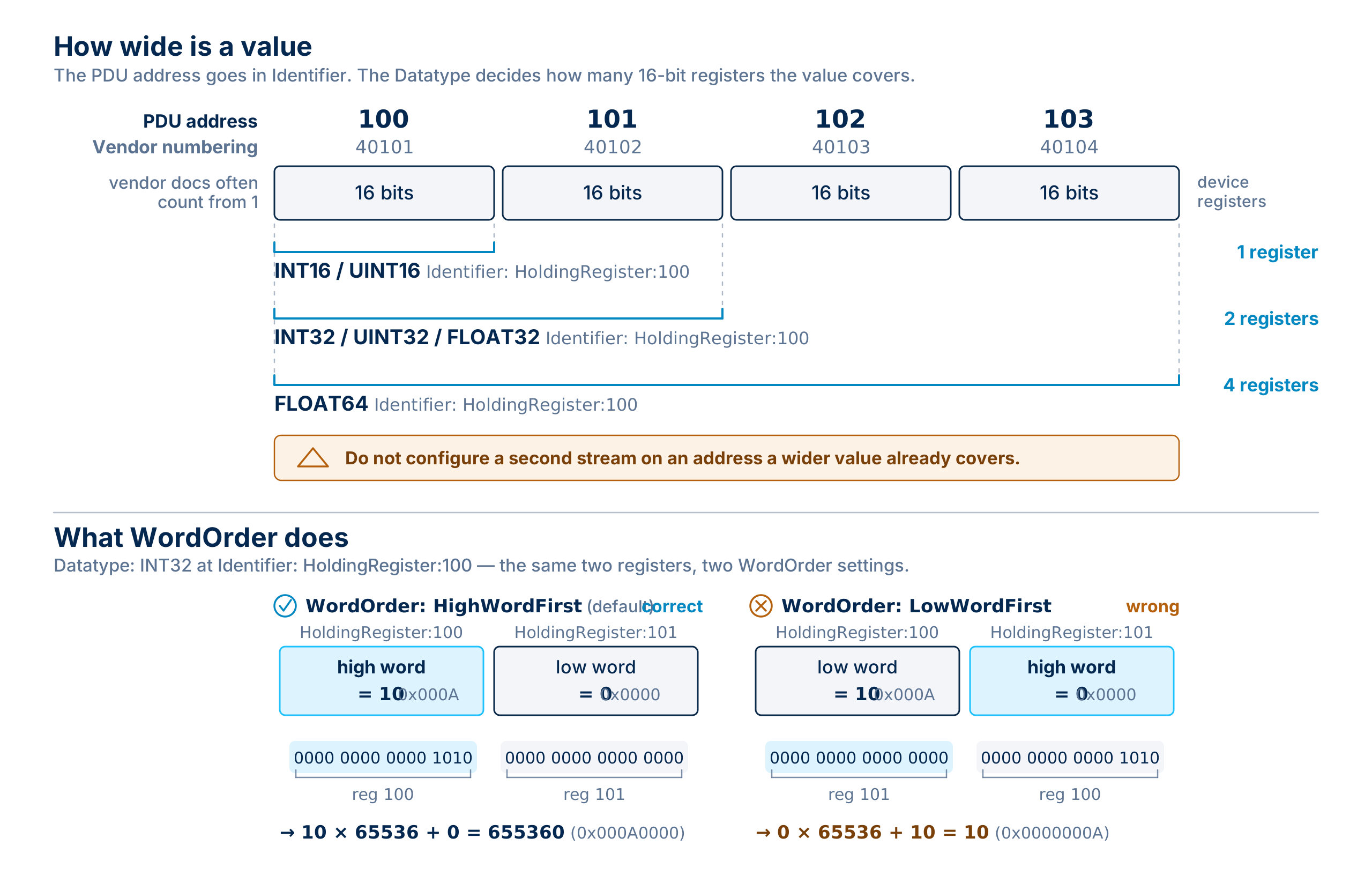
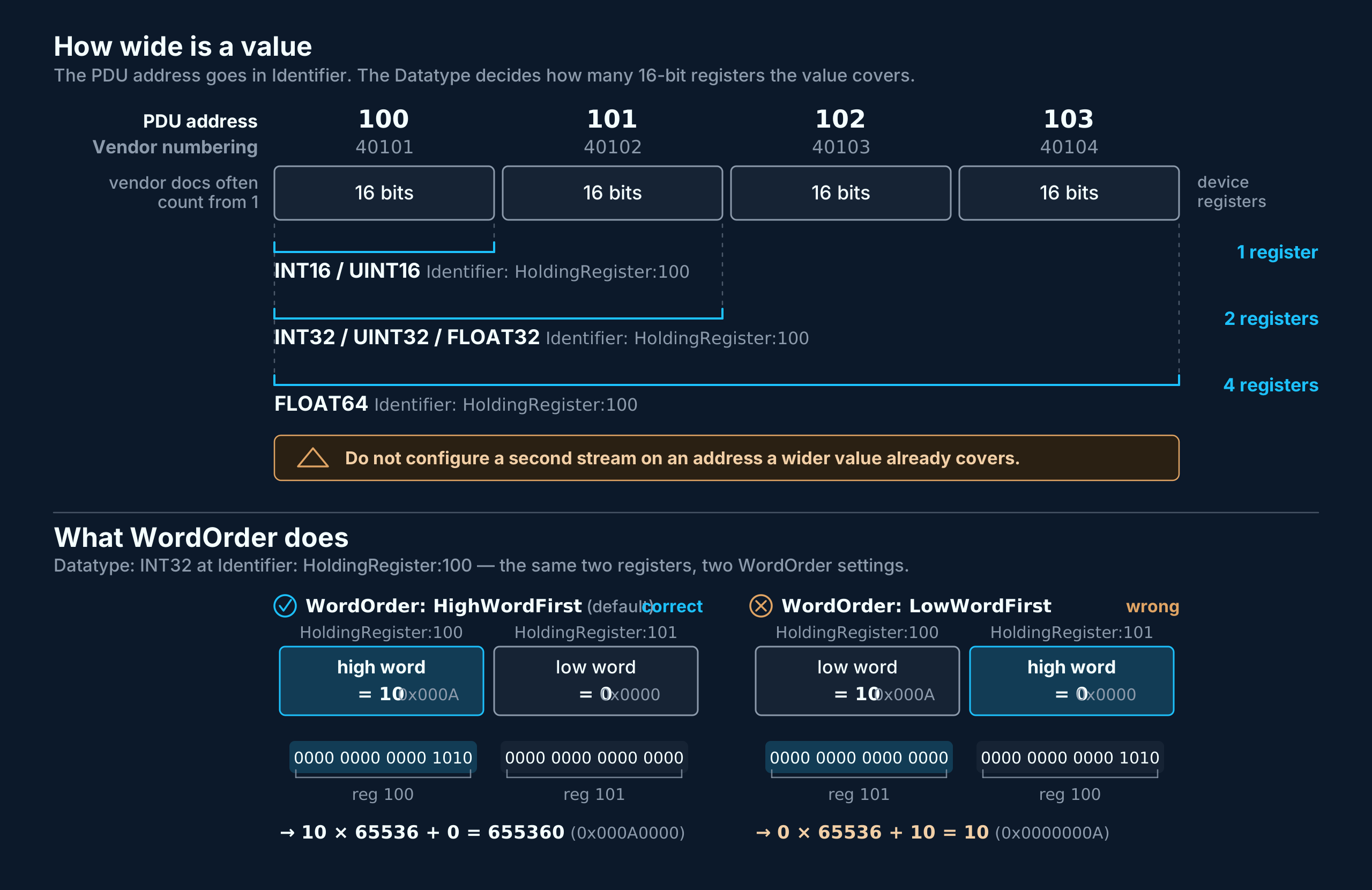
A wrong WordOrder does not cause an error. The values arrive, but the halves of every multi-register number are swapped, the result looks plausible and is wrong. If numbers are far off, this is the first thing to check.
Modbus Parameter
A parameter tells the Source to write a fixed value onto a device and keep it asserted. It is used for setpoints that must survive a device restart and is added with the three dots menu on the right side of the Modbus Device entry, selecting Add Parameter.
| Setting | Value | Required | Default | Description |
|---|---|---|---|---|
| Identifier | RegisterType:Address | Yes | — | Same syntax as for streams, but only Coil and HoldingRegister are allowed. |
| Datatype | same list as for streams | Yes | — | BOOL only together with Coil. Decides how many registers the value spans. |
| WordOrder | HighWordFirst / LowWordFirst | No | HighWordFirst | Register order, for a value spanning several registers. |
| Value | string | Yes | — | Converted to the datatype when written. |
| Name, Unit | string | No | — | Descriptive only. |
A parameter is configuration, not an action: it describes the state the address is supposed to be in, and the Source is what carries out the writes. The handling behaves as follows:
- Every WriteCycleInterval the Source reads the address back and compares it with the Value configured on the parameter. It only writes when the device holds something else, so an unchanged setpoint causes no write traffic.
- If something else changes the address on the device, i.e. another system or a WriteOnce Command, the Source writes the configured Value back on the next cycle. A
WriteOnceonto a parameter address is therefore undone again. - Each device runs its own write cycle, on its own WriteCycleInterval.
- A parameter creates no data stream in the Tributech Node. The value the Source reads back is only used for the comparison and is not forwarded, so nothing about a parameter shows up in the Node on its own. To see the value there, configure a stream on the same address of the same device.
- A read-only target (
DiscreteInput,InputRegister), an unparseable address or a Value that does not fit the datatype is reported as permanently failed and puts the Source intoDegraded. - Some devices refuse to be read on a write-only register. If a device answers the read-back with an illegal-address or illegal-function error, the Source writes the value unconditionally on every cycle instead of giving up on the parameter.
WriteOnce Command
The Modbus Source supports the command WriteOnce, which writes a single value on one device immediately and does not keep it asserted. The command is sent in the COMMANDS tab of the agent (see Commands), commandBody is the base64 encoded payload:
{
  "DeviceId": "6f1d2c3b-4a5e-4f60-8b7c-9d0e1f2a3b4c",
  "Identifier": "HoldingRegister:100",
  "Datatype": "INT32",
  "WordOrder": "HighWordFirst",
  "Value": "777"
}
| Field | Required | Description |
|---|---|---|
| DeviceId | Yes | The twin ID of the Modbus Device to write to. It selects the address and the unit identifier the write is sent with. |
| Identifier | Yes | Same syntax as for streams, and must point at a Coil or a HoldingRegister. |
| Datatype | Yes | Decides how Value is read and how many registers are written. BOOL only with a Coil, the numeric types only with a HoldingRegister. |
| WordOrder | No | Register order of a write spanning several registers, HighWordFirst by default. |
| Value | Yes | Always given as a string. "1" and "true" are both accepted for BOOL. |
The command returns one of the following results:
| Result | Meaning |
|---|---|
Success | The device confirmed the write. The device, the address and the value are contained in the response. |
Rejected | The request itself is not valid and nothing was sent to the device, i.e. an unknown DeviceId, a read-only address space, a missing or unknown Datatype (the tokens are case-sensitive, int32 is not accepted), a datatype that does not fit the register type, or a Value that cannot be read as the given datatype or does not fit into it. |
CommandFailed | The request was valid, but it could not be carried out: the connection to the device is down, or the device answered with an error. |
Health States
With an Expected Health Frequency configured on the source twin (see Modbus Source), the Modbus Source reports one state for the whole source to the Tributech Node in that interval (see Health Check). The state covers every device and every connection:
| State | Meaning |
|---|---|
Ok | Every connection is up, all configured devices answer, all streams and parameters are working. |
Degraded | Everything is connected, but at least one device is not answering, or at least one stream or parameter is permanently faulty, e.g. a wrong address or a read-only write target. Everything else keeps working. Also reported for one interval after a connection was lost and came back within the same interval. |
Unhealthy | At least one connection is up and at least one is down. The devices on the remaining connections keep working. |
Critical | No connection is up at all, or no device is configured yet. |
The health message additionally reports the detail behind the state, so a single failing device can be told apart from a failing network:
| Reported | Meaning |
|---|---|
| Connection state per address | One entry per Host:Port, not per device. |
| Unreachable devices | Devices the gateway answers with an unknown-device error. Their streams are not marked faulty and keep being polled, and the entry disappears on the next successful read. |
| Faulty streams and parameters | Keyed by the device they belong to, so the same address on two devices can be told apart. |
| Connection losses and failed requests since the last message | Failed requests are diagnostic and do not change the state on their own. |
Modbus TCP has no keep-alive, so a lost connection is only detected once a number of requests in a row have gone unanswered on that address, with a slow read cycle this can take about a minute. The Source then reconnects that address on its own, without touching the connections that are still working, and returns to Ok as soon as the devices answer again. An error response from a device proves that the connection is alive, and results in Degraded for the affected address or device, not in a lost connection.
Troubleshooting
| Symptom | Likely cause |
|---|---|
| Values arrive but are far off | WordOrder does not match the device, or the value does not actually span all the registers the datatype reads. |
| A 16-bit value is wrong, the neighbouring register appears in it | Datatype is INT32 on a register that holds 16 bits. Use INT16 or UINT16, the Source widens the value on its own. |
| Values read from the wrong place | Off-by-one address, the Identifier uses the 0-based PDU address, vendor documentation often counts from 1. |
| A device receives no requests at all | UnitIdentifier outside 0…255, the device is dropped from the configuration. |
| One device gets no values, the others do | Host, Port or UnitIdentifier of that device wrong, device switched off, or blocked by a firewall. |
| A device times out on every read behind a gateway | UnitIdentifier is 0 or does not match the slave ID of the device. |
Source reports Degraded | A stream or parameter has an unparseable address, a parameter targets a read-only register type or has a value that does not fit its datatype, or a device is not answering. Fix or remove it, the state returns to Ok. |
Source reports Unhealthy | One of several devices, or one gateway, is unreachable. The devices on the other addresses keep working. |
Source reports Critical | No device can be reached at all, or no Modbus Device is configured on the source. |
| Values arrive less often than expected | ReadCycleInterval, DefaultReadCycleInterval of the device, or Value Change Options attached to the stream. |
A WriteOnce onto a parameter address does not stick | Expected behaviour, the parameter is re-asserted on the next write cycle. Change the parameter value in the twin instead. |
A WriteOnce is Rejected | DeviceId unknown, Datatype missing or not fitting the register type, or Value not readable as that datatype. Nothing was sent to the device. |